
Supercharging the Django Admin

Liam Andrew (mailbackwards) gave a talk at #DjangoCon 2017 about ‘Supercharging the Django Admin’.  Here is some of the information and a GitHub repo with a project demonstrating the information from the talk.

Ways to change the admin classes

  • Add list_display to your Admin class to add more columns to the header field.

Define a method and then add that to the list_display to have arbitrary information, but remember to add prefetch_related to models you load in that method.

  • Allow people to edit things from the admin list using `list_editable` but since this adds a button and a text field, it’s often overwhelming unless used for a specific purpose.


  • Make dynamic actions using a method that returns a select box depending on what the user is attempting to do.


Useful Packages

  • django-admin-row-actions : add a button/action at the end of each row for that individual item
  • django-object-actions : Put buttons in the changelist without editing the template.  Adds a changelist_actions to the admin models.
    return redirect(‘admin:newshound_breed_changelist’)
  • django-nested-admin: Allows multiple layers in one view (breed group, breed, or dog)  with sorting!
  • django-inline-actions: another way to add action buttons to each row


Tips

Beware of over-querying without prefetch!

Repository with concrete examples

https://github.com/mailbackwards/newshound


Maps in python and d3

Sometimes we want to draw maps.  The census bureau has shape files for the different states located here.  There are a lot of additional resources and documentation available here.  There are a lot of ways to use these files.  You can load them into geopandas, fiona, pyshp, osgeo, or a ton of other programs.  Here’s a way to load a shape file into geopandas and pull out two states:

import geopandas as gpd
states = gpd.read_file('cb_2016_us_state_500k/cb_2016_us_state_500k.shp')
just_md_va = states[states.STUSPS.isin(['MD', 'VA'])]
just_md_va.to_file('just_md_va.shp', driver='ESRI Shapefile')

If you want to use maps in d3, then there’s a great resource called TopoJSON, an extension of GeoJSON.  They have a repository of maps here. “TopoJSON is an extension of GeoJSON that encodes topology. Rather than representing geometries discretely, geometries in TopoJSON files are stitched together from shared line segments called arcs.”  This code will draw the outline of the US with county lines:

https://bl.ocks.org/mbostock/4108203

<svg width="960" height="600" fill="none" stroke="#000" stroke-linejoin="round" stroke-linecap="round"></svg>
<script src="https://d3js.org/d3.v4.min.js"></script>
<script src="https://unpkg.com/topojson-client@3"></script>
<script>

var svg = d3.select("svg");

var path = d3.geoPath();

d3.json("https://unpkg.com/us-atlas@1/us/10m.json", function(error, us) {
  if (error) throw error;

  svg.append("path")
      .attr("stroke", "#aaa")
      .attr("stroke-width", 0.5)
      .attr("d", path(topojson.mesh(us, us.objects.counties, function(a, b) { return a !== b && (a.id / 1000 | 0) === (b.id / 1000 | 0); })));

  svg.append("path")
      .attr("stroke-width", 0.5)
      .attr("d", path(topojson.mesh(us, us.objects.states, function(a, b) { return a !== b; })));

  svg.append("path")
      .attr("d", path(topojson.feature(us, us.objects.nation)));
});

</script>

Floating point numbers…. aka why does python not print .00 when I store 50.00 in a float?

Well… there’s not really an answer for the question.   As far as I can tell, python is just being efficient.  Floats will print at least one number to the right of the decimal point.   That number could be a 0 but only if there’s nothing else to the right of the decimal point.  But!  If there’s a 2 way out there in the 15th place, it’ll totally be fine with storing the 14 0s between that and the decimal point (50.000000000000002).  So, if you want python to print what looks like currency, you have to use string formatting –

"{:.2f}".format(50) (https://docs.python.org/3.6/library/string.html)

Alternately, you could use the locale package and locale.currency (https://docs.python.org/3/library/locale.html), or use the Decimal package (https://docs.python.org/3/library/decimal.html).

Floating point numbers have a lot of weird math reasons and computing things behind the scenes as to why they’re stored the way they are.  These are good resources to try and understand machine floats:

https://docs.python.org/3/tutorial/floatingpoint.html

Click to access floating-point-guide-2015-10-15.pdf

Making Recipes – Python Console vs Python Interpreter

Python is a programming language.  Programming languages are designed to help you take a repetitive task and automate the task or communicate how you did an analysis.  cook

You issue commands to the Python interpreter to have python run a series of steps – like making dinner using a recipe.


You can do this in two different ways – using the interactive python console and by using the python interpreter on the command line.

Interactive Python console:

python_console

The triple > means that you’re in the interactive console!  Using the interactive python console is like doing recipe development :recipe_card.jpgYou are testing things out and writing down notes on what works and what doesn’t.  The things that do work, you copy down to a more formal recipe.
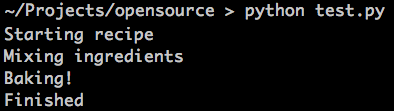
 

Python command line interpreter :

python_command_line

Using the python interpreter on the command line is like being in an industrial kitchen that makes freezer meals – you’re taking a series of steps that someone else wrote and you’re just making a bunch of copies of that dish.  Whenever you need to make that particular dish, you pull that recipe out and follow the steps again.

industrial_kitchen

Either way, you’re cooking!  But the python interactive interpreter is better for when you’re just starting to make something, and the python command line console is better for when you need to produce results.

Django Rest Framework POST 415 with parser_classes

Django Rest Framework includes JSONParser by default (or you can add it with DEFAULT_PARSER_CLASSES), so when you override a ViewSet to take other parser classes it’s easy to forget that the override causes JSONParser to not be included anymore… If you get a 415 “Unsupported Media Type” error and your request is properly sending a “Content-Type”: “application/json” and an “Accept”: “application/json” header, then the next thing to check is if DEFAULT_PARSER_CLASSES (in your config file) or parser_classes in your ViewSet contains JSONParser

from rest_framework import viewsets
from rest_framework.parsers include FormParser, JSONParser, MultiPartParser
from rest_framework import permissions as rest_permissions

from app.services import serializers
from app.services.models import Service

class ServiceViewSet(viewsets.ModelViewSet)
queryset = Service.objects.all()
parser_classes = (FormParser, JSONParser, MultiPartParser)
serializer_class = serializers.ServiceSerializer
permission_classes = [rest_permissions.IsAuthenticated]

Pandas dataframe frustrations

Why are dataframes so complicated in pandas?   If I have a dataframe:

>>> h.head()
Num_Reads  Tag_Count
0          1     179257
1          2      25025
2          3       6629
3          4       2510
4          5       1192

Then in order to access the first row it’s:

>>>h.iloc[[0]]

Num_Reads  Tag_Count
0         1      179257

Why can’t I just use h[0] instead of this iloc thing?  What advantage does that actually give me?  And for some reason I can’t use h.iloc[[1]][0] to access the first column, I have to use h.iloc[[1]][“Num_Reads”].  It’s like pandas can’t understand that Num_Reads is the first column.  Why can’t I have my array indexing and my key indexing like I can with many other languages??  I understand that if I want multiple columns then I need to provide a list of the columns that I want, but there’s no reason why the pandas code can’t be smart enough to determine if I want a single column matching what I selected or a list of columns.
